Flying
Taking Off
You will typically start right after your F-16 was towed out from the hangar, so you will need to taxi to the runway - if your initial heading is north (0) then increase throttle to 10% with ">" or "+" key, wait till you arrive just before runway's centerline and then turn right to Eastern (90) heading.
Do not increase speed too much on the tarmac as you may damage gear and end your mission prematurely.
When centered on runway increase throttle to 100% or engage afterburner with A key.
Pull stick around 180 knots to take off.
Make sure to pull your landing gears with G key before reaching speed around 370 knots and disengage afterburner to save fuel.
Stall
Do not fly slower than around 120 knots otherwise you will stall the plane.
High G turns/climbs may also increase angle of attack so high it will greatly increase drag which may in turn reduce your speed to the stall speed.
Do not fly too high as this also may stall plane - not enough oxygen for your jet engine.
Ejecting
Press Esc key when in air to eject. You have greater success of surviving when you catapult in level flight not too near the ground. If you catapult over enemy territory you may be captured by enemy. If you were successfully recovered military court will assess the validity of the catapulting - leaving a perfectly operational fighter jet may not be consired justified and may end your career.
Landing
Audio narration is in Polish, but you can use automatically generated Youtube subtitles in your preferred language.
Use training missions 1 and 2 to practice landings.
Fly towards a point on the extension of longitudinal axis of the runway far enough from runway's threshold to have enough time to acheive good alignment with runway axis and stabilize glideslope.
You can easily determine if you are on longitudal axis using right MFD Mode 2: POSITION and reading your Y coordinate. In "Królewiec" Campaign and Generator game mode Orneta's Y coordinate is 4300, in WARFARE game mode home airfield has Y coordinate 0.
After aligning your position with the runway longitudinal axis reduce throttle with < or - keys to acheive stable speed below 300knots (about 15%-25% throttle) with nose pitch adusted to maintain glideslope towards point before runway threshold.
Few seconds before reaching the lower threshold of the runway, smoothly raise the nose and reduce speed further so that you continue to maintain a slight descent.
Upon touchdown cut throttle and engage brakes (with B key) to reach full stop before runway ends.
If you have problems landing you can change landing difficulty setting.
Upon landing and stopping in some game modes your plane will be refuelled, rearmed and minor aircraft system malfunctions wil be repaired.
Note that fuselage damage is not being repaired.
VSI indicator
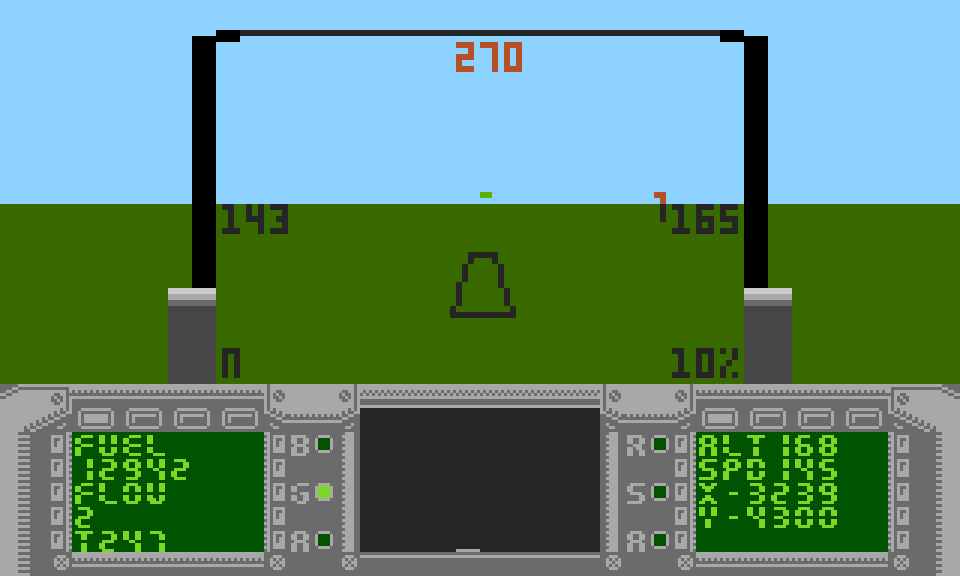
When you have landing gear extended and are below around 1000 feet a Vertical Speed Indicator (VSI) will be shown to the left of your altitude on HUD - it is a line extending up or down from zero point that shows how fast your plane is ascending or descending. Few seconds before touchdown you should have speed below 145knots and point nose a bit above horizon - slow forward speed will make lift not enough to compensate gravity thus your plane will maintain slow descend making your pland properly land first touching ground with rear wheels.
Ending the mission
After successfull landing you do not need to taxi back to the hangar, just press Esc key to end the mission. Note if you press Esc while airborne you will eject from the plane.