Single generated mission game mode
Description
Fly single procedurally generated mission - each time different one or enter mission seed to refly exactly the same generated mission.
This game mode was introduced in v.2.0.0.
Single generated mission screens
First select difficulty for single generated mission - see Difficulty settings screen.
Single generated mission briefing screen
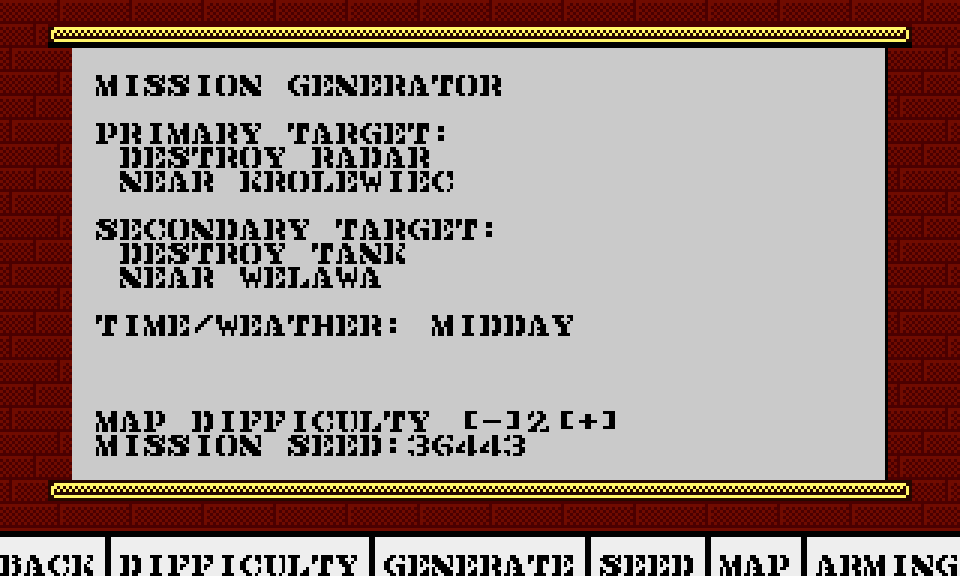
Briefing screen describes mission targets. Destroy both targets for full success.
Use joystick and fire button on [-] and [+] to change generated map difficulty.
Use GENERATE button to generate different mission - note that new mission seed will be updated.
Write down seed and Map difficulty level if you want to later refly exactly the same mission.
Use SEED button to manually enter (using keyboard) seed so you can refly the same mission.
Note that Map difficulty must be set to the same level for mission to be regenerated exactly the same.
Use ARMING button to proceed to Arming screen from which you can start the mission.
Mission map
Use MAP button to view flight plan on Briefing map.
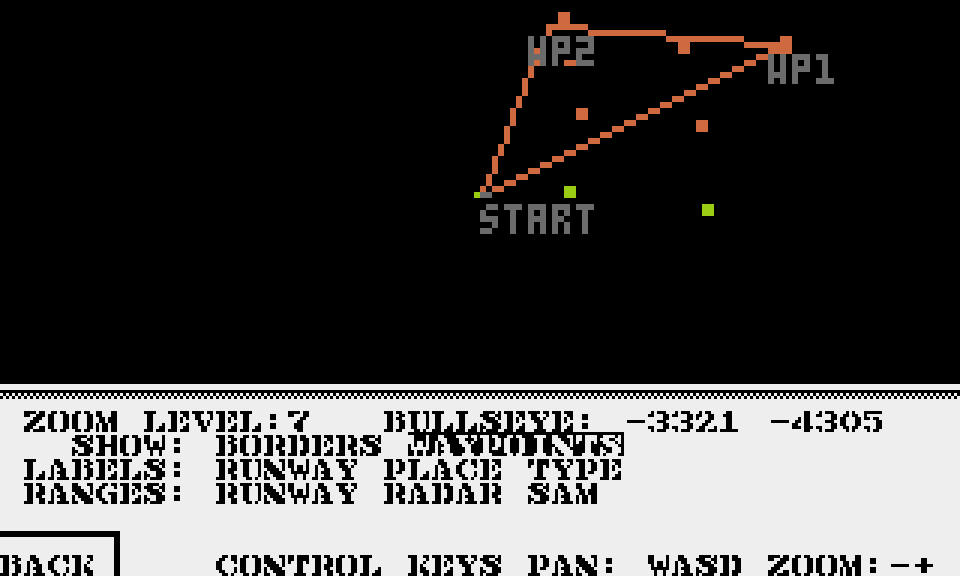
On the map when SHOW: WAYPOINTS is selected:
Red line marks path between home airbase and targets.
WP1 - marks location of primary target.
WP2 - marks location of secondary target.
Note that mobile units are not marked on the map.
Generated mission win conditions
Full success is when you destroy both primary and secondary target.
Partial success is when you destroy only primary or only secondary target.
You recieve more points for fully successful mission.