Warfare game mode
Description
WARFARE game mode simulates dynamic war - friendly and enemy structures like cities, depots and runways periodically send units to destroy or capture cities of the opposite side.
You win when your units capture all enemy cities and destroy all enemy military depots and runways.
You as the last fighter can help your side to tip the scales of victory.
This game mode was introduced in v.2.0.0.
Warfare briefing screen
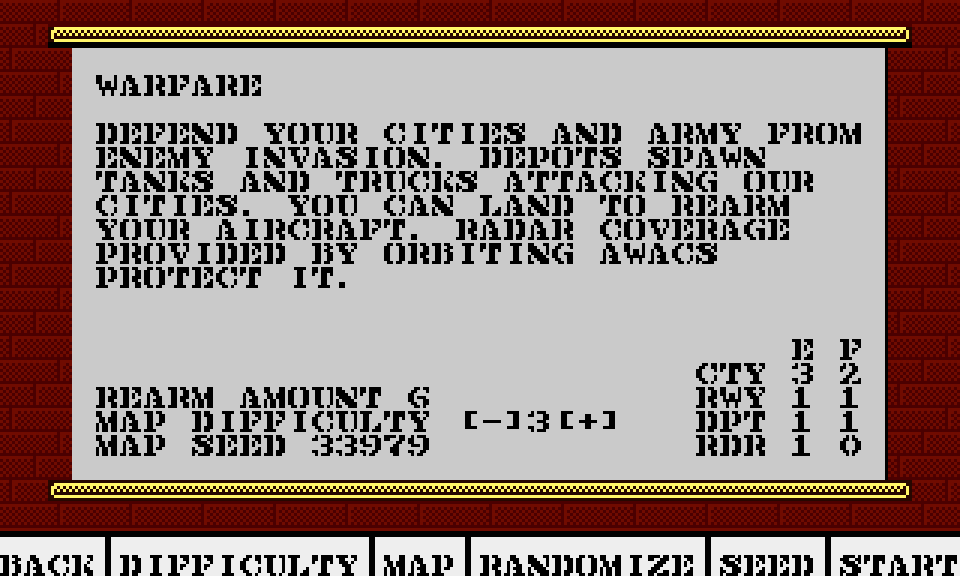
Use joystick and fire button on [-] and [+] to change generated warfare map difficulty - it affects the amount of structures and enemies as shown in the lower right part of the briefing screen:
- "E" columns show enemy amount
- "F" columns show friendly amount
Use RANDOMIZE button to generate different mission with same settings - note that new map seed number will be generated.
Write down seed number and Map difficulty setting if you want to later refly exactly the same mission.
Use SEED button to manually enter (using keyboard) seed numeric value so you can refly the same warfare map.
Note that Map difficulty must be set to the same level for the map to be regenerated exactly the same.
Warfare win conditions
- For full success you must help your friendly units to capture all cities and destroy all enemy depots and runways on the map.
- For partial success all cities must be friendly, but there may still exist other enemy units / structures.
- In both cases you must successfully land on the home runway and press Esc key to end the flight.
Warfare mechanics
Your (friendly) cities on the briefing and navigation maps are colored green and labeled on the map as CITA, CITB etc.
Initially enemy cities are red and labeled CIT1, CIT2 etc.
Same labeling scheme is used for depots (DEP) and enemy runways (RWY).
Capturing cities/depots
- Cities/depots get captured when their defence points drop to 0 - each opposite side unit reaching given structure lowers its defence points.
- Bombers generate more damages than ground units.
- Both friendly and enemy cities/depots periodically send trucks with soldiers or tanks to capture enemy structures or attack enemy units.
- You will receive radio messages like
RADIO: ENEMY TRUCK HDG 56 DST 6Mto inform you about new friendly/enemy units and their position relative to your current position. - When given city gets captured you will receive radio message like:
RADIO: FRIENDLY TRUCK CAPTURES CIT1. - Your home airbase will periodically send bombers.
- Enemy runways will periodically send fighters or bombers, enemy runways will send fighters when you will be in airfield's detection range.
- You can help your forces to capture enemy cities by attacking them, but you cannot destroy nor capture city by yourself - capturing must be done by your ground forces or bombers (sending paratroopers).
- Depots and runways can be destroyed - it may require several hits or several units.
- Enemy may try to destroy your home airbase - you will receive radio message like:
RADIO: ENEMY BOMBER ATTACKS HOME. - Units that reach their target city or structure stay there (they dissapear from the map).
- Units destroyed by enemy decrease our score, but units destroyed by your friendly forces do not add to your score.
Rearming / refueling / repairing
- You can land to rearm and refuel your plane, some damages that can be quickly repaired will also get fixed - but home airbase has resources to do it only
REARM AMOUNTtimes. - How many rearm/repair/refuelling is available is shown in
REARM AMOUNTsecion and is affected byWEAPON REALISMdifficulty setting.
Enemy Waves
- Periodically enemy performs synchronized attack (wave) - all enemy cities, depots and runways will spawn mobile units.
- You will be notified about enemy wave with radio message:
RADIO: ENEMY WAVE.
Weapon payload
- Your aircraft is provided with custom weapon payload:
50xCANNON, 4xAMR, 2xSDW, 14xLAU, 4xBMB, 4xMAV, 1xHRM. - You cannot change payload setup (no
ARMINGoption).
Warfare friendly AWACS support
Friendly AWACS is patrolling near home airfield, providing you with the full radar coverage - thus you can see all units on the navigation map, but beware that enemy fighters may attack it.
You will receive radio message DEFEND AWACS! when it detects enemy fighters is planning to attack it.
If enemy fighters will manage to destroy your AWACS you will only see units in your radar range.
Warfare map
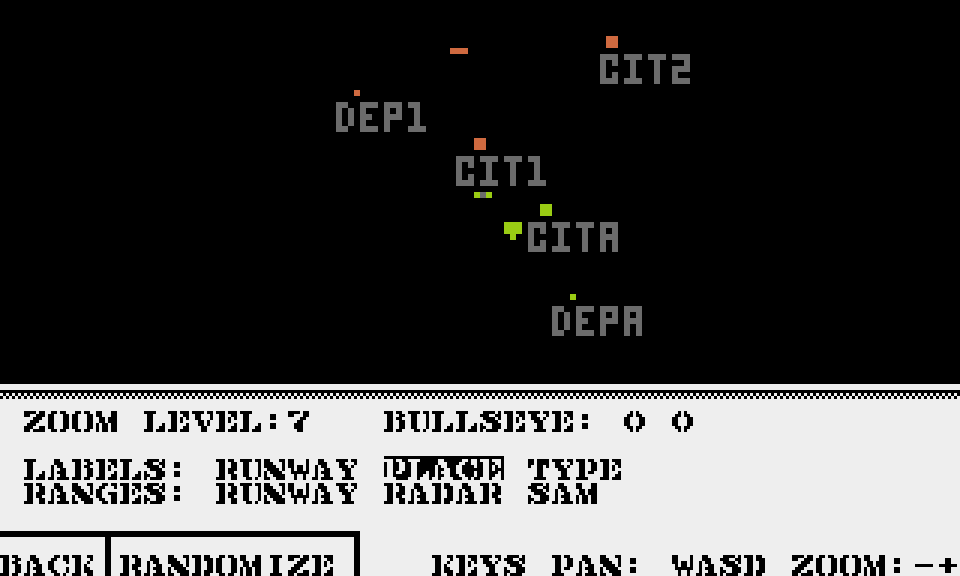
Use RANDOMIZE button to generate different warfare map with the same settings - just like on the briefing screen.
See more info about Briefing map.